

IPsec zet een versleutelde site-to-site-tunnel op in beide richtingen tussen de speciale gateway van uw privénetwerk en een VPN-concentrator aan uw kant, op uw bedrijfsnetwerk of in een cloud-VPC. Zodra de tunnel actief is, wordt het verkeer tussen de twee netwerken versleuteld en geauthenticeerd, zodat SIM’s toegang hebben tot bronnen op uw netwerk en uw netwerk toegang heeft tot SIM’s.
Zie voor de architectuur van het privénetwerk en de configuratie van WireGuard Privé-netwerken en het instellen van WireGuard.
Overzicht
Bij de meeste IoT-implementaties wordt gebruikgemaakt van een applicatieserver met een openbaar IP-adres, waarnaar apparaten via het openbare internet gegevens versturen. Een typisch voorbeeld hiervan is een GPS-tracker die elke vijf minuten zijn locatie doorgeeft; hiervoor is helemaal geen tunnel nodig.
IPsec is bedoeld voor implementaties waarbij juist het tegenovergestelde nodig is: een privéverbinding tussen uw eigen netwerk en het subnet waarop uw simkaarten zich bevinden. Zodra de tunnel is opgezet, kunnen de simkaarten servers bereiken die u nooit aan het internet hebt blootgesteld, en kan uw netwerk de simkaarten bereiken.
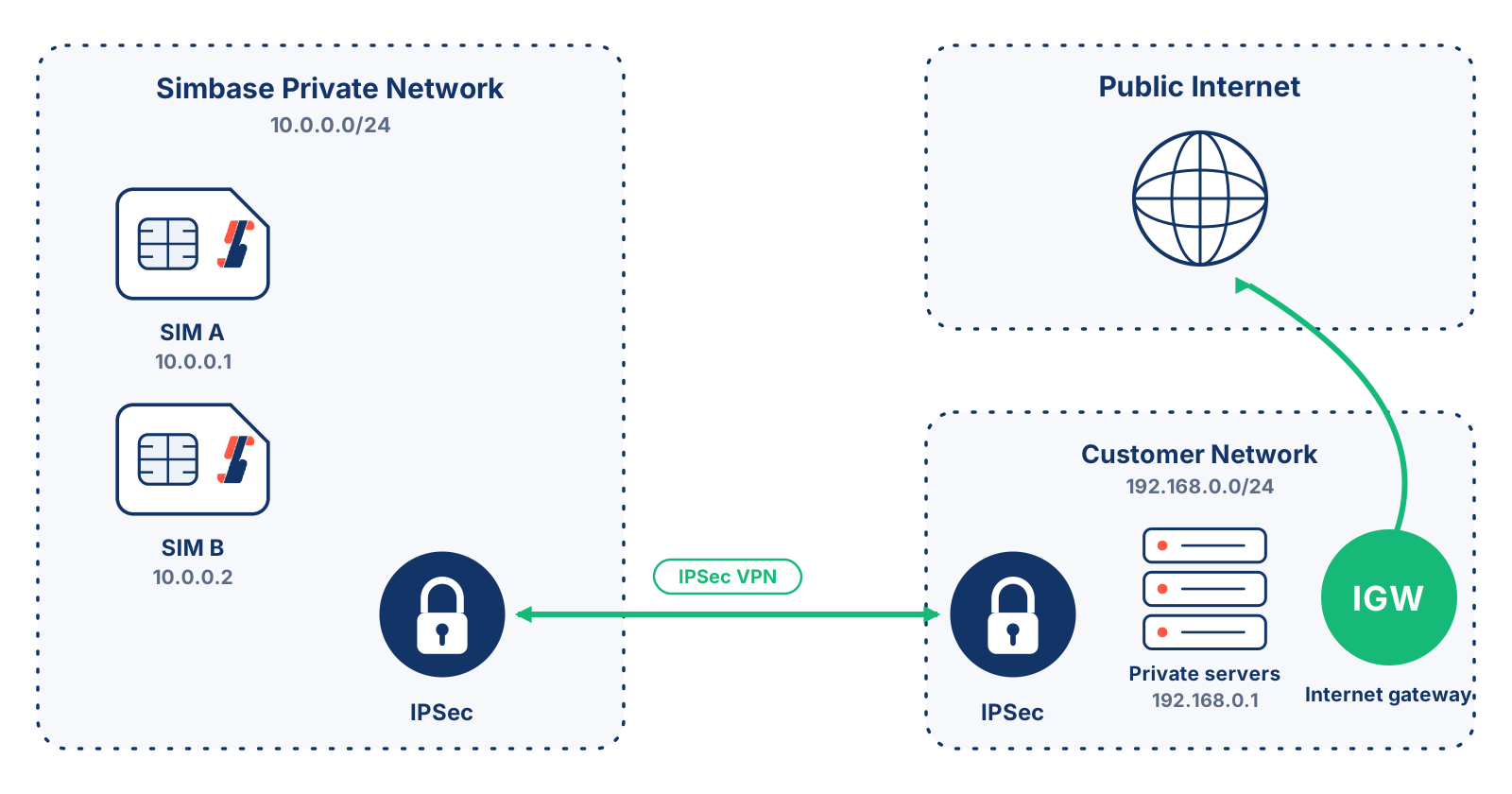
De Netwerk op afstand De instelling in fase 2 bepaalt hoeveel verkeer via dat pad loopt. Als deze op 0.0.0.0/0 staat, verloopt al het verkeer dat de SIM-kaarten verzenden via de tunnel, zodat uw eigen internetgateway hun internettoegang afhandelt en u elk inkomend en uitgaand pakket kunt controleren. Als u een specifiek subnet instelt, maakt alleen het verkeer dat bestemd is voor dat netwerk gebruik van de tunnel en bereikt de rest het internet zoals gewoonlijk via de gateway van Simbase.
Het onderstaande diagram toont het geval 0.0.0.0/0, waarbij al het SIM-verkeer naar het netwerk van de klant wordt gerouteerd.
Een IPsec-tunnel instellen
Voordat u de tunnel configureert, moet u uw privénetwerk inrichten en zorgen dat u over een VPN-concentrator beschikt. De basisstappen zijn:
Een privé-netwerk inrichten. Zie Privé-netwerken en het instellen van WireGuard.
Implementeer een VPN-concentrator in uw bedrijfs- of cloudnetwerk met een openbaar IP-adres. Simbase adviseert pfSense als je er nog geen hebt.
Configureer de IPsec-tunnel in het Simbase-dashboard.
Stel de IPsec-tunnel op je VPN-concentrator dienovereenkomstig in.
Test de tunnel in een laboratoriumomgeving voordat u deze in de productieomgeving gaat gebruiken. De precieze stappen zijn afhankelijk van het merk en de software van uw concentrator; raadpleeg de bijbehorende documentatie en overweeg om een netwerkingenieur in te schakelen bij grotere of complexere opstellingen.
IPsec configureren (Simbase-dashboard)
Algemeen
| Instelling | Beschrijving |
|---|---|
Versie met sleuteluitwisseling | Stelt de tunnel in. IKEv2 is sneller en veiliger dan IKEv1 en verdient de voorkeur als je concentrator dit ondersteunt. Kies ‘auto’ als je twijfelt. |
IP-adres van Simbase | Het IP-adres van de Simbase VPN-concentrator. Noteer dit, je hebt het nodig bij het configureren van jouw kant. |
IP-adres op afstand | Het openbare IPv4-adres van je VPN-concentrator. |
Vooraf gedeelde sleutel | Verifieert de twee uiteinden van de tunnel. Gebruik een lange, willekeurige sleutel of neem de voorgestelde sleutel over. Vermijd speciale tekens. Deel deze sleutel nooit met anderen! Iedereen die deze sleutel heeft, kan de tunnel compromitteren. |
Versie met sleuteluitwisseling
IP-adres van Simbase
IP-adres op afstand
Vooraf gedeelde sleutel
Phase 1 (Key exchange)
| Instelling | Beschrijving |
|---|---|
Versleutelingsalgoritme | Versleutelt het verkeer bij de sleuteluitwisseling. AES128-GCM (128-bit) wordt aanbevolen voor de beste balans tussen beveiliging en prestaties. |
Hash-algoritme | Controleert de integriteit van het verkeer bij de sleuteluitwisseling. SHA256 wordt aanbevolen. SHA1 wordt over het algemeen als onveilig beschouwd en moet worden vermeden. |
DH-groepsleutel | Diffie-Hellman-groep voor de sleuteluitwisseling. DH-groep 14 (2048-bit) wordt aanbevolen. |
Levensduur | Hoe lang de fase 1-sessie duurt voordat er opnieuw wordt onderhandeld, in seconden. 28800 is een verstandige standaardwaarde. Stel één eindpunt in op deze waarde en het andere op ten minste 10% hoger (bijv. 31.680) om overlapping te voorkomen. Bereik: 20.000–86.400 seconden. |
Detectie van inactieve peers | Controleert of de peer nog actief is met behulp van IKEv2 INFORMATIONAL-uitwisselingen of IKEv1 R_U_THERE-berichten. Wordt alleen uitgevoerd als er gedurende de ingestelde vertraging geen IKE- of ESP/AH-pakket is ontvangen. Stel deze optie in op ‘uitgeschakeld’ als u twijfelt. |
Versleutelingsalgoritme
Hash-algoritme
DH-groepsleutel
Levensduur
Detectie van inactieve peers
Phase 2 (Data session)
| Instelling | Beschrijving |
|---|---|
SIM-netwerk | Het subnet dat door uw simkaarten wordt gebruikt. Dit staat vast en kan niet worden gewijzigd. |
Netwerk op afstand | Het subnet aan uw kant van de tunnel, in CIDR-notatie. Stel dit in op 0.0.0.0/0 om al het SIM-verkeer naar uw netwerk te leiden. |
ESP | Encapsulating Security Payload: zorgt voor de versleuteling en authenticatie van tunnelverkeer. Kan niet worden gewijzigd. |
Versleutelingsalgoritme | Versleutelt het tunnelverkeer. AES128-GCM (128-bit) wordt aanbevolen. |
Hash-algoritme | Controleert de integriteit van het tunnelverkeer. SHA256 wordt aanbevolen. SHA1 wordt over het algemeen als onveilig beschouwd en moet worden vermeden. |
DH-groepsleutel | Diffie-Hellman-groep voor de gegevenssessie. DH-groep 14 (2048-bit) wordt aanbevolen. |
Levensduur | Hoe lang de gegevenssessie duurt voordat de Child SA verloopt, in seconden. Deze waarde moet groter zijn dan de rekey-tijd. Stel één eindpunt in op deze waarde en het andere op een waarde die ten minste 10% hoger is, bijvoorbeeld 5400, om overlapping te voorkomen. Bereik: 1800 tot 7200 seconden. |
SIM-netwerk
Netwerk op afstand
ESP
Versleutelingsalgoritme
Hash-algoritme
DH-groepsleutel
Levensduur
IPsec configureren (aan uw kant)
Hoe je IPsec aan jouw kant configureert, hangt af van je concentrator. In de onderstaande demo wordt het proces in pfSense stap voor stap uitgelegd.
Veelgestelde vragen
Ja. De tunnel komt uit op de speciale gateway van je privénetwerk, dus zorg er eerst voor dat je het netwerk implementeert en er simkaarten aan toewijst. Zie Privé-netwerken en het instellen van WireGuard
Zwart, Groen en Rood. IPsec draait bovenop een privénetwerk, en privénetwerken zijn nog niet beschikbaar op Blauw en Geel.
Ja. Tunnels worden per tunnel en per dag in rekening gebracht, bovenop de kosten voor het privénetwerk waarmee de tunnel is verbonden. Zie Factureerbare posten.
Elk apparaat dat standaard IPsec ondersteunt, waaronder Cisco ASA, Palo Alto en Fortinet. Simbase raadt pfSense aan als u dat nog niet gebruikt.
Gerelateerd
Privé-netwerken en het instellen van WireGuard — de architectuur met een speciale gateway en de WireGuard-configuratie
VPN voor het IoT — wanneer een VPN de extra complexiteit waard is
Network Address Translation (NAT) — wat dit betekent voor het IoT
Openbare IP-adressen — voor bereikbaarheid via inkomende gesprekken op één simkaart zonder eigen netwerk
Compatibiliteitscontrole — controleer of uw apparaten compatibel zijn voordat u ze in gebruik neemt


© 2026 Simbase. Alle rechten voorbehouden.