

Ogni indicazione temporale nella dashboard di Simbase viene visualizzata nel fuso orario del tuo account: sessioni dati, eventi SIM, registri SMS e cronologia di utilizzo. Per impostazione predefinita, il fuso orario viene impostato automaticamente al momento della registrazione, in base all'indirizzo IP da cui hai effettuato la registrazione. Questo articolo spiega come modificarlo e quali sono le conseguenze di tale modifica.
Imposta un nuovo fuso orario
Apri la dashboard.
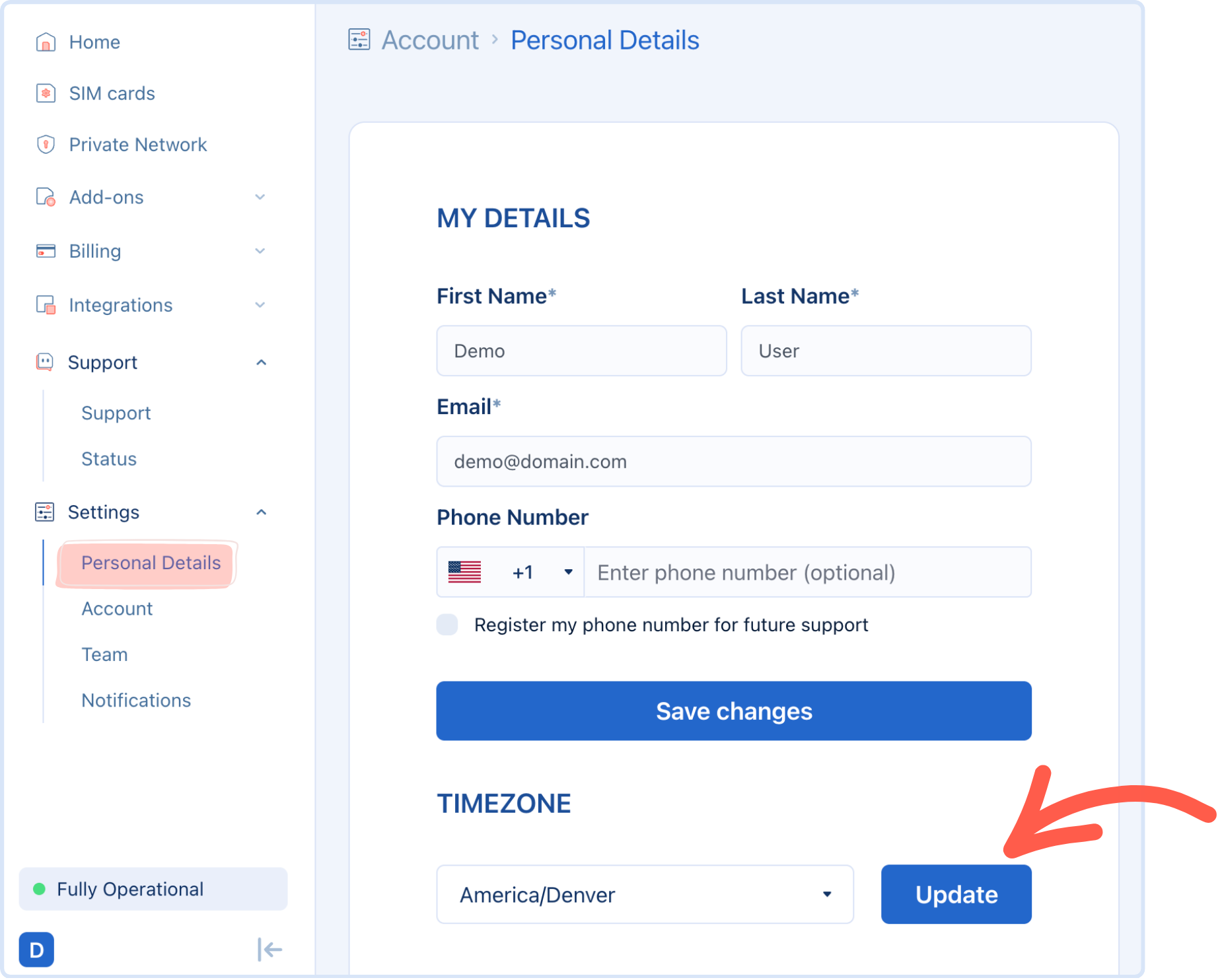
Vai a Impostazioni → Dati personali.
Seleziona il fuso orario desiderato dall'elenco.
Salva.
Il nuovo fuso orario ha effetto immediato. Non è previsto alcun periodo di attesa né è necessario disconnettersi e riconnettersi.
A cosa si riferisce
La modifica del fuso orario del tuo account aggiorna il modo in cui vengono visualizzati i timestamp visualizzato su tutto il cruscotto, tra cui:
Orari di inizio e fine della sessione di dati
Eventi relativi alla registrazione della SIM e alle modifiche di stato
Registro delle SMS inviate e ricevute
Cronologia di utilizzo illustrato in Utilizzo dei dati e superamento dei limiti
La modifica del fuso orario non altera la data effettiva in cui si è verificato un evento, ma modifica solo la modalità di visualizzazione di tali orari. I dati sottostanti e i periodi di fatturazione non ne risentono.
Perché potresti volerlo modificare
Il tuo account è stato creato da un ufficio, ma il tuo team o la tua flotta opera in un fuso orario diverso e preferiresti visualizzare i timestamp della dashboard nell'ora locale.
Stai risolvendo un problema con un partner o un operatore che comunica gli orari in un fuso orario specifico e desideri allinearti temporaneamente a tale fuso orario.
Domande frequenti
No, la valuta di fatturazione è distinta e fissa (vedi Crea un account). Il fuso orario influisce solo sulla visualizzazione dei timestamp.
Sì. A differenza della valuta di fatturazione, l'impostazione del fuso orario può essere modificata tutte le volte che vuoi.
I timestamp visualizzati relativi agli eventi storici vengono aggiornati immediatamente in base al nuovo fuso orario. Gli orari degli eventi stessi non sono cambiati, ma è cambiato solo il fuso orario utilizzato per visualizzarli.
Correlati
Crea un account — come viene impostato il fuso orario predefinito al momento della registrazione
Utilizzo dei dati e superamento dei limiti — in che modo i timestamp di utilizzo sono correlati all’arrivo dei dati CDR
Disattivazione automatica — comportamento pianificato che viene eseguito in UTC


© 2026 Simbase. Tutti i diritti riservati.