

Every IP address is either private or public. The difference comes down to one question: can devices anywhere on the internet send packets directly to that address? For private IPs, the answer is no. For public IPs, the answer is yes.
Private IP addresses
Private IPs are reserved by the IETF (RFC 1918) for use inside private networks. There are three blocks:
| Range | Common Use |
|---|---|
10.0.0.0/8 | Large enterprise networks, cloud VPCs |
172.16.0.0/12 | Mid-size networks, container networks (Docker uses 172.17.0.0/16 by default) |
192.168.0.0/16 | Home routers, small office networks |
10.0.0.0/8
172.16.0.0/12
192.168.0.0/16
Properties:
Not globally unique. The same private IP can be in use simultaneously inside thousands of different networks.
Not reachable from the internet. Internet routers drop packets destined for these ranges by default.
Assigned locally. Usually by a router (DHCP) inside the network the device sits on.
Free. No registration, no fees, no allocation authority.
Your home Wi-Fi network almost certainly uses 192.168.x.x for the devices on it.
Public IP addresses
Public IPs are globally unique addresses allocated by regional internet registries (RIRs): ARIN in North America, RIPE in Europe, APNIC in Asia-Pacific, and so on.
Properties:
Globally unique. Only one device on the internet has this address at any given moment.
Reachable from the internet. Any internet-connected device can send packets to this address (subject to firewalls).
Allocated. Through ISPs and operators, and ultimately from RIRs.
Costly. IPv4 public addresses are scarce, and ISPs typically charge for static allocations.
Web servers, mail servers, VPN endpoints, anything that needs to be reachable from outside its own network has a public IP.
How they interact
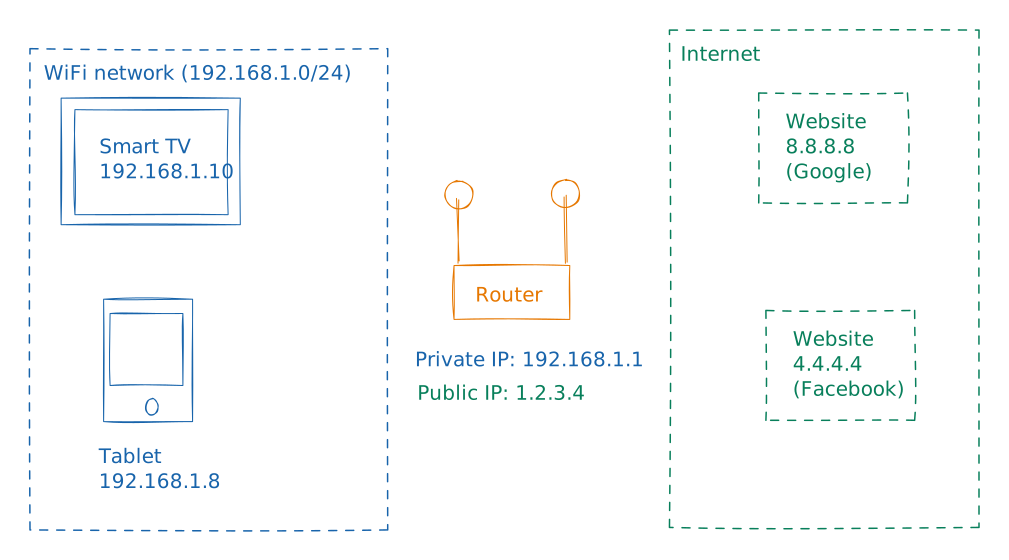
Most devices on the internet today don't have their own public IP. They sit on a private network behind a router that has one public IP. The router uses NAT to translate between the two. See Network Address Translation (NAT).
This works fine for outbound traffic. The device requests a webpage, the router translates the private source to its public IP, the response comes back, the router translates it back. It does not work for inbound traffic. The internet has no way to know which device behind the router should get an unexpected packet.
Implications for Simbase SIMs
| Default Simbase SIM | With a Public IP assigned |
|---|---|
Private IP behind NAT | Public IP, no NAT |
Outbound traffic works | Outbound and inbound both work |
Cannot be reached from the internet | Reachable, subject to your firewall rules |
No additional charge | Daily fee per IP |
Private IP behind NAT
Outbound traffic works
Cannot be reached from the internet
No additional charge
Common misconceptions
"A static IP is the same as a public IP." No, these are independent concepts. Static means the IP doesn't change between attaches. Public means the IP is reachable from the internet. You can have any combination: static private (rare for SIMs), dynamic public, or static public.
"Private IPs are insecure." No. Private IPs are more secure than public IPs in the inbound direction, because they're not reachable from the internet. They can still be attacked from inside the network they're on.
"My device will get the same IP every time." No. Simbase SIMs get an IP via DHCP at attach, and the same SIM may get different IPs over time. If you need a stable address, assign a Public IP for a routable static address, or use a private network for static addressing inside your own subnet.
Common questions
A public IP is globally unique and reachable from the internet. A private IP only has meaning inside one network, and internet routers drop packets sent to it. Simbase SIMs get a private IP by default and sit behind NAT, so they can make outbound connections but can't be reached inbound.
Check the SIM in the dashboard. Unless you've assigned a Public IP, it has a private one. Private addresses fall in the 10.x.x.x, 172.16–31.x.x, or 192.168.x.x ranges.
Yes, on different networks. Private ranges aren't globally unique, so the same address can be in use in thousands of separate networks at once without conflict, because none of them are reachable from each other.
Related
IP addresses — the parent article on IPv4 and subnets
Network Address Translation (NAT) — how one public address serves many SIMs
Public IPs — assign a routable address to a SIM


© 2026 Simbase. All rights reserved.