

Theft protection, often called IMEI lock, is a security feature that binds a Simbase SIM to the IMEI (the unique identifier of a cellular device) of the first device it is used in. If the SIM is removed and inserted in a different device, the new device's IMEI won't match the locked one, and Simbase automatically disables the SIM.
This article covers what Theft protection does, when it's worth turning on, and the one operational gotcha you need to plan for.
When to use Theft protection
| Scenario | Theft protection? |
|---|---|
Fixed installation, device unlikely to be moved | Strongly recommended. The device won't move, so the lock never gets in the way. |
Vehicle telematics, asset trackers in customer hands | Recommended. Devices leave your control, which is exactly the theft case. |
SIMs on engineer benches for testing | Skip. You'll swap devices often. |
Pool of spare SIMs not yet deployed | Optional based on the use case. If enabled, SIMs will lock to the first IMEI they are paired with. |
SIMs in shared/loaner devices | Use carefully. Every legitimate swap requires a manual disable and re-enable cycle. |
Fixed installation, device unlikely to be moved
Vehicle telematics, asset trackers in customer hands
SIMs on engineer benches for testing
Pool of spare SIMs not yet deployed
SIMs in shared/loaner devices
What it protects against
SIM theft. A stolen SIM placed in a different device is locked out as soon as the IMEI change is detected.
Unauthorized repurposing. A SIM removed from a deployed device and placed in a personal phone (intentionally or not) won't work.
Fraud and data theft. Sensitive data accessed via a Simbase SIM is harder to exfiltrate if the SIM itself only works in the original device.
What it doesn't protect against:
A compromised device. If the device itself is compromised, the SIM still works in that device. Theft protection only checks the IMEI, not the integrity of the firmware.
SIM cloning. Theft protection works on the IMEI the network reports. It doesn't prevent the SIM secret being extracted from a stolen card.
Data interception in transit. Use TLS and/or a VPN for that.
How it works
The first time a SIM with Theft protection enabled generates network activity in a device, Simbase records that device's IMEI against the SIM. Every time the network reports the IMEI after that, Simbase checks it:
Match: attach allowed, SIM passes traffic as normal.
Mismatch: the SIM is automatically disabled the moment the change is detected, traffic stops, and Simbase emails the technical contact on the account.
If the SIM gets disabled by an IMEI mismatch, it stays Disabled until you intervene. Either disable Theft protection and re-enable the SIM, or move the SIM back into the original device.
Enable Theft protection
Per SIM, in the dashboard
Sign in to dashboard.simbase.com.
Open the SIM you want to protect.
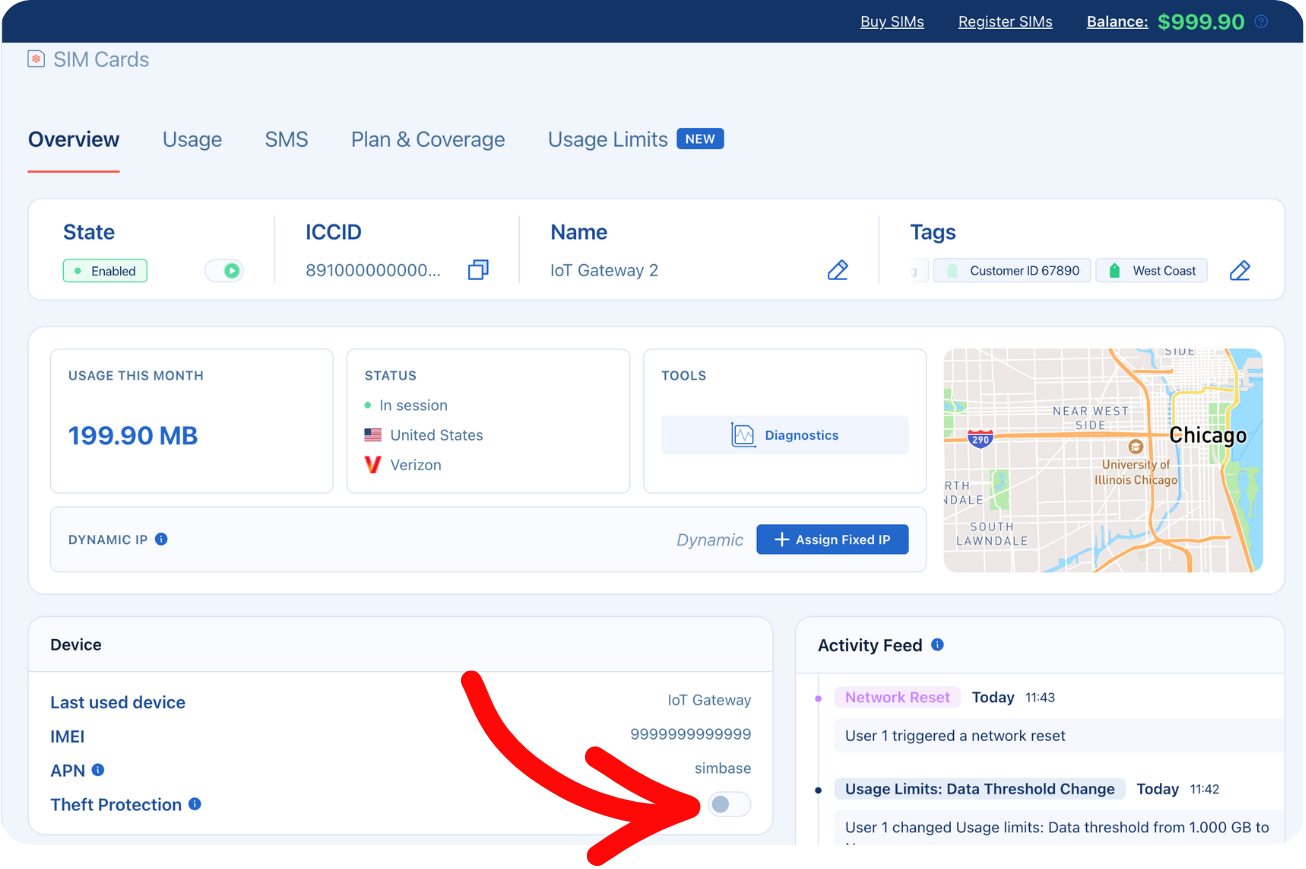
Find the Theft protection toggle.
Switch it on.
The SIM is now bound to the next IMEI reported for it. If it's already attached in a device, that device's IMEI is recorded immediately.
Via the API
Create an API key with the
simcards.details:writescope, from Integrations → API in the dashboard. Keys are scoped on creation and scopes cannot be changed afterward.Send a PATCH request to the SIM, setting
imei_locktoon.
Request
Response
A successful call returns 200 listing the fields that changed.
The SIM binds to the IMEI it's currently reporting, or to the first IMEI reported for it if it hasn't been seen on the network yet. This is the same behavior as the dashboard toggle.
To turn it off, send "imei_lock": "off". This clears the binding and the SIM can attach in any device.
Turn Theft protection off
The same steps, in reverse:
Open the SIM in the dashboard.
Toggle Theft protection off.
After disabling:
The IMEI binding is cleared.
The SIM can attach in any device.
If you re-enable Theft protection later, the binding starts fresh. The next IMEI reported becomes the new locked IMEI.
Plan for legitimate device swaps
This is the biggest operational consideration: whenever you swap the device a SIM lives in, you have to disable Theft protection first. Otherwise:
You move the SIM into the replacement device.
The device powers on and attaches with its new IMEI.
Simbase sees the mismatch and auto-disables the SIM.
You now have a disabled SIM in the field, and it can only be re-enabled from the dashboard or API.
The correct flow:
Disable Theft protection on the SIM in the dashboard before the physical swap.
Swap the SIM into the new device.
Power the new device on and let it attach successfully.
Re-enable Theft protection. The new device's IMEI becomes the new locked IMEI.
For organizations doing frequent field swaps, consider scripting this via the API.
Checking IMEI status
In the dashboard
Open the SIM in the dashboard.
The Theft protection field shows the toggle state and the locked IMEI, if any.
Use this to verify a SIM is bound to the device you expect, which is useful during deployment QA.
Via the API
Retrieve the SIM with GET /v2/simcards/{ICCID}. The key needs the simcards.details:read scope.
The response includes both values, abridged here:
imei_lock is on or off. imei is the IMEI the SIM is currently reporting, which is the locked IMEI when the lock is on.
To audit a fleet, list your ICCIDs with GET /v2/simcards and call the detail endpoint for each, staying within the limit of 10 calls per second.
Common questions
Two options. Move the SIM back into its original device, or disable Theft protection and then re-enable the SIM. Disabling Theft protection alone won't bring it back online; you have to re-enable the SIM as well. If the SIM was genuinely stolen, leave it disabled.
No. Theft protection is one IMEI per SIM. For workflows that swap between two known devices, disable Theft protection or script the rotation.
No. The IMEI doesn't change on reboot. Theft protection only fires on an actual IMEI mismatch.
Yes. Simbase emails the technical contact on the account as soon as an IMEI mismatch disables a SIM. Keep that contact's details up to date in your Simbase account settings.
Related
SIM state — what happens when a SIM is disabled by Theft protection
Diagnostics — flags Theft protection mismatches
API — programmatic Theft protection control
VPN — additional security beyond IMEI lock


© 2026 Simbase. All rights reserved.