

Die integrierte Funktion von Simbase Nutzungsbeschränkungen Überprüfen Sie die Nutzung, sobald die CDRs vom Netzwerk eintreffen, in der Regel alle paar Stunden. Falls Sie strengere Kontrollen (alle 30 Minuten, alle 5 Minuten, auf Abruf) oder benutzerdefinierte Logik (bei Warnung benachrichtigen, nur bestimmte SIM-Karten deaktivieren, Geschäftszeiten ausschließen), die Usage Guard Toolkit ist eine No-Code-Automatisierung, die Sie mithilfe der Simbase-API und Make.com selbst erstellen können.
In diesem Artikel erfahren Sie, was das Toolkit leistet, wann es die richtige Lösung ist und wie man es einrichtet.
Was das Toolkit leistet
Eine zeitgesteuerte Automatisierung, die:
Abfragen der Simbase-Nutzungs-API für jede SIM-Karte in Ihrem Konto (oder eine gefilterte Teilmenge davon).
Vergleicht die Nutzung für jede SIM-Karte anhand eines von Ihnen festgelegten Schwellenwerts.
Deaktiviert SIM-Karten, die den Schwellenwert überschreiten über die Simbase-API.
Benachrichtigt Sie (Slack, E-Mail, Webhook, Google Sheets-Protokoll – was auch immer Sie einbinden).
Es basiert auf Make.com weil es visuell und ohne Programmieraufwand funktioniert und die meisten Kunden es in weniger als 15 Minuten zum Laufen bringen können. Die gleiche Logik funktioniert auch in Zapier, n8n oder einem benutzerdefinierten Skript. Make.com ist lediglich der Weg, den Simbase dokumentiert hat.
Wenn das Toolkit die richtige Lösung ist
Entscheiden Sie sich für das Toolkit anstelle (oder zusätzlich zu) den nativen Nutzungsbeschränkungen, wenn Sie Folgendes benötigen:
Kürzere Prüfintervalle. Die nativen Nutzungsbeschränkungen gelten ab dem Zeitpunkt des CDR-Eingangs; das Toolkit kann so oft ausgeführt werden, wie es Ihre Automatisierungsplattform zulässt.
Benutzerdefinierte Benachrichtigungsabläufe. Möchtest du bei 80 % der Obergrenze eine Benachrichtigung in Slack erhalten und diese bei 100 % deaktivieren? Dann richte es ein.
Mehrstufige Schwellenwerte. Erst warnen, dann deaktivieren, dann den Betrieb benachrichtigen – alles in einem Arbeitsablauf.
Bedingungen für Geschäftsregeln. Deaktivierung an Wochenenden überspringen, bestimmte Tags ignorieren, nur Test-SIM-Karten deaktivieren und so weiter.
Systemübergreifende Integration. Synchronisieren Sie die Nutzungsdaten mit Ihrem CRM, protokollieren Sie jedes Deaktivierungsereignis in einem Data Warehouse und so weiter.
Halten Sie sich an die systemeigenen Nutzungsbeschränkungen, wenn:
Das Standardverhalten (Deaktivierung bei Überschreitung des Limits, optionaler monatlicher automatischer Reset) entspricht Ihren Vorstellungen.
Sie möchten keine Automatisierungslösung eines Drittanbieters weiterbetreiben.
Sie benötigen keine benutzerdefinierten Benachrichtigungen oder Geschäftslogik.
Sie können Folgendes verwenden: beides: Die nativen Nutzungsbeschränkungen dienen als Grundlage, während das Toolkit die Grenzfälle abdeckt. Es gibt keine Konflikte.
Was das Toolkit nicht leisten kann
Es gelten dieselben Einschränkungen wie bei den nativen Nutzungsbeschränkungen: Das hängt von den Nutzungsdaten von Simbase ab., was von der Übermittlung der CDRs aus dem Netzwerk abhängt. Ein Toolkit, das alle 5 Minuten ausgeführt wird, arbeitet weiterhin mit CDRs, die möglicherweise schon mehrere Stunden alt sind.
Für eine echte Echtzeit-Obergrenze müsstest du den Datenverbrauch überwachen auf dem Gerät selbst und das Gerät soll die Verbindung unterbrechen, sobald das Limit erreicht ist. Das geht über die Möglichkeiten von Simbase oder Make.com hinaus.
Entwurf
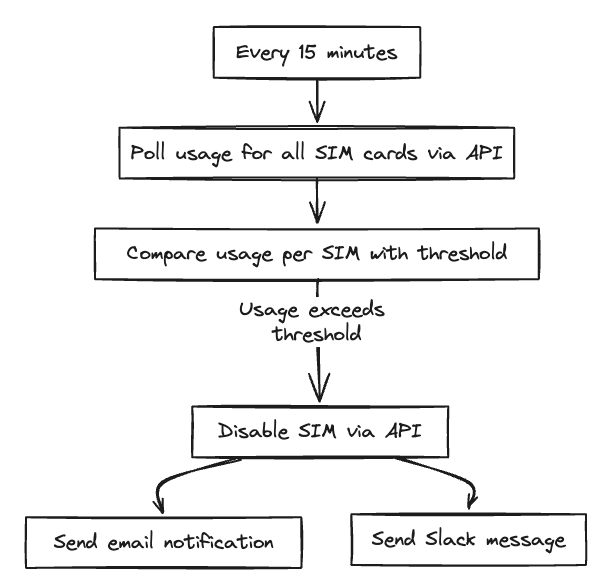
Wenn das kompliziert aussieht, mach dir keine Sorgen. Dieses Tutorial führt dich Schritt für Schritt durch die Erstellung deines eigenen „Usage Guard Toolkit“. Du musst keinen Code schreiben, und wir zeigen dir genau, wie du es mit Make.com einrichtest.
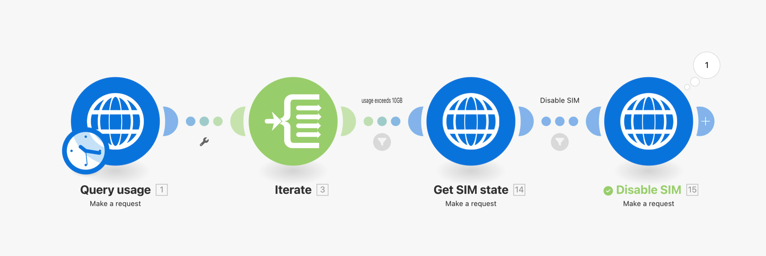
Einrichtung des Toolkits
Schritt 1: Wählen Sie Ihre Automatisierungsplattform aus
Make.com wird für Einsteiger empfohlen:
Visueller Flow-Builder, keine Programmierung erforderlich.
Für kleine Flotten reicht die kostenlose Stufe aus.
Die kostenpflichtigen Tarife sind für größere Flotten und kürzere Intervalle ausgelegt.
Zapier, n8n, Pipedream oder ein benutzerdefiniertes Python-/Node-Skript – alles funktioniert. Im weiteren Verlauf dieser Anleitung wird Make.com verwendet; die gleichen Module und die gleiche Logik gelten jedoch auch für andere Lösungen.
Schritt 2: Einen Simbase-API-Schlüssel erstellen
Anmelden bei dashboard.simbase.com.
Weiter zu Integrationen → API.
Klicken Neuen API-Schlüssel erstellen.
Nenn es, wie du willst
Usage Guard Toolkit(oder ähnliches).Alle Ressourcen auf Schreiben. Behalten Sie die Standardeinstellungen in den erweiterten Einstellungen bei.
Klicken Sie auf Erstellen und kopieren Sie den Schlüssel.
Siehe API-Schlüssel welche Rechte die einzelnen Berechtigungsstufen umfassen.
Schritt 3: Importieren Sie die Make.com-Blaupause
Simbase veröffentlicht eine vorkonfigurierte Vorlage, die Sie mit einem einzigen Schritt importieren können:
Laden Sie den Entwurf herunter (suche nach
Simbase-Usage-Guard-Toolkit.blueprint.json, ~27 KB).Erstellen Sie in Make.com ein neues Szenario.
Verwendung Blaupause importieren und wählen Sie die heruntergeladene JSON-Datei aus.
Öffnen jedes der drei HTTP-Module und Den Platzhalter ersetzen YoUrApiKeYHeRe mit Ihrem API-Schlüssel.
Stellen Sie die Nutzungsgrenze im Vergleichsmodul (Standardbeispiel: 10 GB).
Testen Sie das Szenario manuell, bevor Sie den Zeitplan aktivieren.
Der Entwurf regelt den grundlegenden Ablauf: Nutzungsdaten abrufen → SIM-Karten durchlaufen → mit Schwellenwert vergleichen → aktuellen SIM-Status prüfen → SIM-Karten deaktivieren, die noch nicht deaktiviert sind.
Schritt 4: An Ihre Bedürfnisse anpassen
Die Vorlage dient als Ausgangspunkt. Häufige Anpassungen:
Schwellenwertumrechnung. Die API gibt die Nutzung in Byte an, und zwar in binären Gigabyte: 1 GB = 1.073.741.824 Byte, also 10 GB = 10.737.418.240. Dies entspricht nicht der Konvention im Dashboard, wo ein Nutzungslimit von 1 GB 1.000 MB bedeutet. Ein Toolkit-Schwellenwert von 10 GB liegt etwa 7 % über einem Nutzungslimit von 10 GB. Wenn Sie möchten, dass beide Werte übereinstimmen, stellen Sie den Toolkit-Vergleich stattdessen auf 10.000.000.000 ein.
Paginierung. Dafür werden etwa 500 SIM-Karten benötigt. Siehe unten den Abschnitt zur Paginierung für große Flotten.
Benachrichtigungen. Fügen Sie ein Modul hinzu, um eine Benachrichtigung über Slack, per E-Mail oder Webhook zu senden, wenn eine SIM-Karte den Schwellenwert überschreitet.
Tag-Filter. Wende die Überprüfung nur auf SIM-Karten mit einem bestimmten Tag an (zum Beispiel,
Produktionnur, ausschließenTest).
Durchlaufen des SIM-Arrays
Die Nutzungs-API gibt ein Array von SIM-Objekten unter dem data.simcards Feld. So bearbeiten Sie jedes Feld einzeln in Make.com:
Legen Sie im HTTP-Modul Folgendes fest: Antwort auswerten zu Ja.
Füge ein Iterator Modul.
Setze das Array des Iterators auf
data.simcardsaus der HTTP-Antwort.
Jede Iteration ist dann eine einzelne SIM-Karte, die Sie vergleichen und auf deren Grundlage Sie Maßnahmen ergreifen können.
Paginierung für große Flotten
Die Vorlage enthält standardmäßig keine Paginierung. Sie funktioniert ohne Anpassungen für Flotten mit bis zu einigen hundert SIM-Karten. Für größere Flotten:
Überprüfen Sie die API-Antwort auf
"has_more": true.Falls zutreffend, lies die
CursorWert.Senden Sie eine weitere Anfrage an
/v2/usage/simcards?cursor=<value>.Wiederhole dies, bis
has_moreist falsch.
Bei Make.com wird dies mit einem Repeater und eine HTTP-Anfrage-Schleife, was über den Rahmen des grundlegenden Konzepts hinausgeht.
Haftungsausschluss
Das Usage Guard Toolkit ist Selbermachen. Es nutzt zwar die offizielle Simbase-API, Simbase übernimmt keine Haftung für:
Verpasste Obergrenzen aufgrund von CDR- oder API-Verzögerungen.
SIM-Karten werden nicht rechtzeitig deaktiviert.
Daraus resultierende Mehrkosten, Kosten oder Betriebsunterbrechungen.
Testen Sie Ihre Konfiguration sorgfältig, überwachen Sie sie regelmäßig und verlassen Sie sich nicht ausschließlich darauf als einzige Sicherheitsmaßnahme für SIMs, bei denen Kostenüberschreitungen katastrophale Folgen hätten.
Häufig gestellte Fragen
Ja. Die Logik lässt sich direkt übertragen. Die Make.com-Blaupause dient als Ausgangspunkt; erstellen Sie dieselben Module in Zapier mithilfe von HTTP-Anfrageschritten nach.
Ja. Fügen Sie ein geplantes Szenario hinzu, das am 1. jedes Monats ausgeführt wird und SIM-Karten anhand eines Tags oder Filters wieder aktiviert. Die native Funktion „Monatliche automatische Zurücksetzung bei Überschreitung der Nutzungslimits“ übernimmt dies für Sie, wenn Sie nur das grundlegende Verhalten benötigen.
Häufiger bedeutet nicht unbedingt genauer. Das Toolkit liest die Simbase-Nutzungsdaten aus, die erst aktualisiert werden, wenn CDRs aus dem Netzwerk eintreffen – oft im Abstand von mehreren Stunden. Eine Ausführung alle 5 Minuten führt meist dazu, dass dieselben Zahlen erneut ausgelesen werden, was die Automatisierungsvorgänge überlastet. Alle 15 bis 30 Minuten reichen für die meisten Fuhrparks aus.
Die SIM-Karten werden dadurch nicht deaktiviert. Das Toolkit ist das einzige Mittel, das Ihren benutzerdefinierten Schwellenwert durchsetzt. Ein pausiertes Szenario, ein abgelaufener API-Schlüssel oder ein ausgeschöpfter Make.com-Tarif heben diese Sicherheitsmaßnahme daher stillschweigend auf. Aktivieren Sie Fehlerbenachrichtigungen in Make.com und lassen Sie die nativen Nutzungslimits als Absicherung im Hintergrund aktiviert.
Verwandte Themen
Nutzungsbeschränkungen — die native Alternative mit geringerer Reibung
Automatische Deaktivierung — kalenderbasierte Deaktivierung
API-Schlüssel — den Schlüssel erstellen und definieren, mit dem sich das Toolkit authentifiziert
API — die zugrunde liegende Schnittstelle
Stichwörter — nützlich, um den Anwendungsbereich des Toolkits auf Teilmengen der Flotte einzugrenzen


© 2026 Simbase. Alle Rechte vorbehalten.