

If you build your own IoT hardware, the connection logic you write into the firmware matters more than the SIM you put in it. A roaming SIM gives your device access to many carriers, but the device decides which one to use, when to retry, and whether to give up.
This guide covers the configuration choices that decide whether a fleet stays online: network prioritization, retry back-off, connectivity checks, session handling, and firmware policy.
The device chooses the network, not the SIM
This is the single most common misunderstanding, and it changes how you debug everything else.
A Simbase SIM provides access to multiple carriers. It does not pick between them. The modem decides, using its own logic: signal strength, the operator list stored on the device, whether it has seen the network before, and how the firmware is configured. If a device keeps attaching to a weak network while a stronger one is available, that is a device configuration issue, not a SIM issue.
Practically: if you want a device to prefer a particular carrier, you configure that in the modem's firmware, where supported.
Build a preferred network list with fallback
Most fleets have carrier preferences for a reason. A device may be certified on one carrier and not another, or a commercial agreement may favor a particular network. A preferred network list expresses that, without painting you into a corner.
The order to work through:
Attempt the first preferred network.
If it fails, attempt the next preferred network.
Continue through the priority list until every preferred network has been tried.
Attempt any available network that is not on the list.
If none succeeded, start again from the first preferred network.
Step 4 is the one people leave out. A device that will only ever attach to three named networks has no route back online when all three are unavailable, which is exactly the moment you need it most.
Space out retries with progressive back-off
Retry timing is where well-intentioned firmware causes real damage. A device that retries every few seconds looks like a misbehaving device to the roaming partner, and roaming partners respond by temporarily or permanently barring it. Recovering from that is slow and manual.
Increase the wait between attempts each time:
First retry after 1 minute.
Second retry after 2 minutes.
Third retry after 4 minutes.
After several full cycles, back off to an hour or more, depending on how quickly the device needs to recover.
The aim is to cycle through networks methodically, reconnect promptly when one becomes available, and never look like a device hammering the network.
Be careful with blacklists
Some devices support blacklisting networks outright. It has its uses, for a network that consistently underperforms or that your hardware is genuinely incompatible with.
We advise caution, particularly for roaming deployments. Every blacklisted network is one fewer route to connectivity, and blacklists tend to accumulate: added during a bad week, never reviewed, still in the firmware two years later when that network is the only one covering a new site.
Prefer a priority list that ranks networks over a blacklist that forbids them. Ranking degrades gracefully. Blocking does not.
Verify connectivity with ping tests
A device can be attached to a network, show full signal, and still have no working internet path.
A periodic ping to a reliable target, commonly Google's DNS resolver at 8.8.8.8, confirms that traffic actually reaches the internet and comes back. A failed ping is a useful trigger to tear down the connection and restart network selection.
We recommend a ping test at least once an hour, with any failure prompting a reconnect. Tune the frequency to your data budget: each test costs a small amount of data, and on a low-usage device tested too often, connectivity checks can become a noticeable share of the bill. See Data usage and overages for how sessions are measured and rounded.
Attaching to a network and opening a data session are two steps
Full internet access takes both, and conflating them makes connectivity problems much harder to diagnose.
Attaching to the network
The device registers with a cellular network, much as a phone attaches to a nearby tower. At this point it has signal and is known to the network, but cannot move data.
This asks the modem to select a network automatically.
Opening a PDP session
A Packet Data Protocol session opens the gateway that data actually flows through. First define the context with your APN:
Then activate it:
Replace APN_NAME with the APN for your SIM profile. Most profiles use simbase. See Set up the APN for the APN that matches your profile and use case.
Keep the session open
Holding a PDP session open avoids the overhead of renegotiating one for every transmission. It also has a direct billing effect: each session is rounded up to 1 kB and costs are calculated to four decimal places, so a device that opens and closes a session for every small reading bills considerably more than its payload suggests. For low-data applications, one long session is usually cheaper than many short ones.
Reconnect to the network every 24 hours
Keeping the data session open is worth doing. Staying attached to the same network indefinitely is not.
Networks periodically force reauthorization of long-attached devices, and a forced reauthorization tends to arrive at an inconvenient moment. Detaching and reattaching roughly every 24 hours, on your schedule rather than theirs, keeps the device's authorization fresh and turns an unpredictable interruption into a controlled one.
Keep firmware current, but not bleeding edge
Modem manufacturers ship firmware updates that improve network compatibility, roaming behavior and security, and staying current genuinely helps across regions.
Being first to a new release does not. New modem firmware can introduce regressions in exactly the areas you care about. Let a release settle before rolling it across a fleet, and stage the rollout when you do.
Monitor real-world performance and adjust
Connection logic that looks correct on a bench behaves differently across a fleet. Once your logic is deployed, track:
Retry success rate, and which attempt in the sequence usually succeeds.
Session duration, and how often sessions end unexpectedly.
Which networks devices actually attach to, by region.
How often connectivity checks fail while the device is still attached.
Those numbers tell you whether your priority order matches reality and whether your back-off intervals are too aggressive or too relaxed. Diagnostics shows what the network sees for an individual SIM, which is a good cross-check when a device's own logs suggest one thing and connectivity says another.
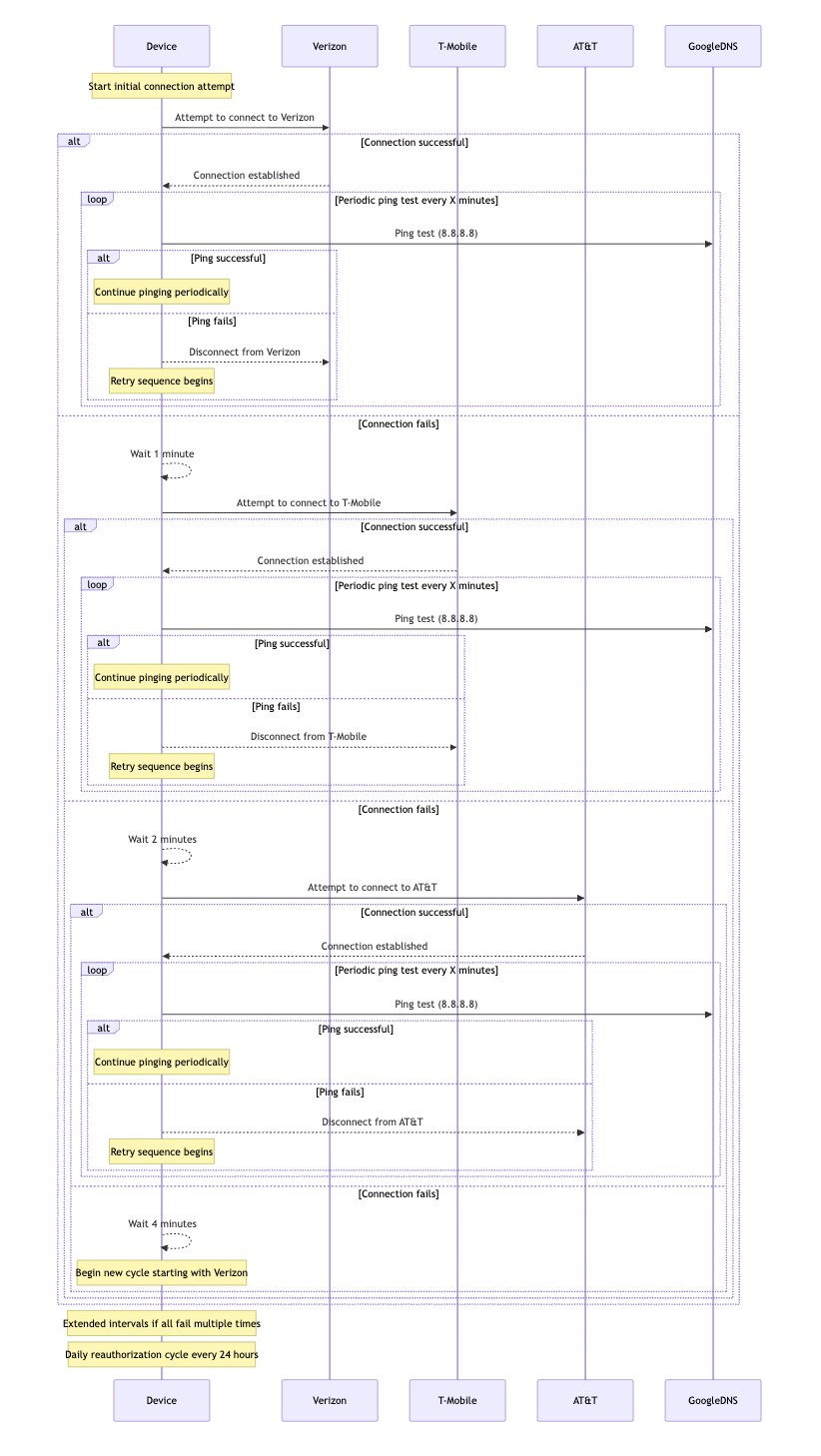
Worked example: a US deployment
A device on a roaming SIM in the United States, with the three major networks available.
Preferred network order
Verizon.
T-Mobile.
AT&T.
Registration sequence
Attempt Verizon. On success, open a data session and operate normally. On failure, wait 1 minute.
Attempt T-Mobile. On success, open a data session. On failure, wait 2 minutes.
Attempt AT&T. On success, open a data session. On failure, wait 4 minutes and start a new cycle from Verizon.
When every network refuses
If all three reject the device, which can happen during a service incident or when a SIM has been disabled, extend the intervals rather than continuing to cycle:
After the 4-minute retry, wait 1 hour before running the full preferred order again.
If there is still no connection after that, move to 4-hour intervals.
Connectivity check
Once a data session is open, ping 8.8.8.8 periodically. If the ping fails, detach from the current network and restart the sequence from Verizon.
Daily reauthorization
To maintain network performance and allow for any necessary reauthorization, the device disconnects and reconnects to the network every 24 hours.
Daily reconnection: the device disconnects from its current network, then follows the initial prioritization sequence (Verizon, T-Mobile, AT&T) to re-establish its connection.
This keeps authorization current and reduces the risk of a forced reauthorization by the network.
Common questions
No. Network selection happens on the device. The SIM provides access to the carriers in your coverage plan, and the modem chooses between them, so preference has to be configured in firmware.
At least hourly, treating a failed check as a prompt to reconnect. Increase the interval if data cost matters more than fast recovery, since every check consumes billable data.
Keep it open. Every session is rounded up to 1 kB, so frequent short sessions cost more than one long one for the same payload, and reconnecting adds latency and failure points.
Usually repeated failed attach attempts in quick succession. Roaming partners bar devices that behave this way, so progressive back-off between retries is what keeps a device off that list.
Related
Connectivity issues — diagnose a SIM that will not connect
Set up the APN — the APN value for your profile and use case
Diagnostics — see what the network reports for a specific SIM
Data roaming — how roaming works on a Simbase SIM
Data usage and overages — how sessions are measured and billed


© 2026 Simbase. All rights reserved.